
MediaMonkey
Ventis Media Inc.
2 Apr 2014
21 Nov 2025
71.5 MB
2.1.1.1290
8.0
1,000,000+

Description
We often juggle thousands of music and video files scattered across different devices in the digital age. How can we manage a large collection of songs, podcasts, audiobooks, and videos without feeling overwhelmed? MediaMonkey is the perfect solution for anyone with a vast library of media. Here are five main reasons why you should download MediaMonkey and enjoy an amazing music experience.
Wireless Sync Saves You Time
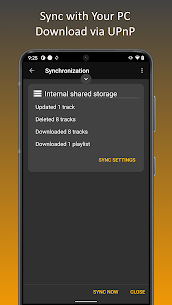
One of MediaMonkey’s standout features is the ability to sync wirelessly between your Android device and MediaMonkey for Windows. The app allows you to sync playlists, songs, videos, and file details like ratings, lyrics, and play history. This feature makes it easy to move your content between devices without needing a USB connection, saving you time and ensuring your collection stays in perfect sync. Wireless syncing offers flexibility, allowing you to access your entire media library across multiple devices effortlessly.
Simple and User-Friendly Interface
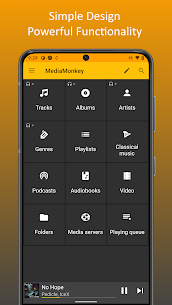
MediaMonkey boasts a simple yet powerful interface that helps you manage different types of content like music, classical tracks, audiobooks, podcasts, and videos. You can easily browse your library by artist, album, genre, or playlist, making it convenient to quickly find specific songs. Additionally, MediaMonkey supports batch editing of file information, so you can update multiple files at once. You can even lookup album art and lyrics online, giving you a richer and more complete music experience.
Smart and Convenient Playlist Management
Another reason MediaMonkey stands out is its smart playlist management. You can create nested playlists, easily adding, removing, and rearranging songs however you like. Plus, these playlists can be synced with MediaMonkey on Windows, so you have the same playlists available on all your devices. For music lovers who enjoy creating custom playlists based on their mood, this is a must-have feature.
Intuitive Player and Queue Management
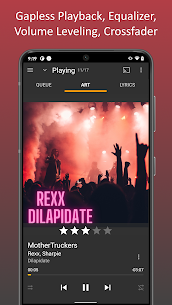
MediaMonkey isn’t just a powerful media manager; it’s also an excellent music and video player. One of its best features is the ability to play music at a consistent volume using the replay gain feature, so you don’t have to worry about sudden volume changes between songs. You can also fine-tune the sound with a 5-band equalizer, letting you adjust the audio to your personal preferences. The app even includes a sleep timer, which is perfect for those who like to fall asleep to music without worrying about it playing all night. Plus, MediaMonkey supports casting to Chromecast or UPnP/DLNA devices, allowing you to play music on your TV, home audio system, or other compatible devices easily.
Customize and Upgrade with MediaMonkey Pro
If you need more advanced features, MediaMonkey offers a Pro version with additional capabilities. You can use the “live mode” to create and play pre-set playlists, which is especially useful for live performances or when you need to practice on a specific schedule. The Pro version also supports unlimited USB syncing, giving you more control over your media collection. What’s even better is that MediaMonkey is ad-free, so you can focus on enjoying your music without interruptions.
Conclusion
MediaMonkey is not just a music and video manager; it’s a comprehensive tool that helps you sync, manage, and play media across multiple devices. With powerful features like wireless syncing, a user-friendly interface, smart playlist management, and customizable sound settings, MediaMonkey is a must-have app for any music lover.
Whether you’re a professional music collector, DJ, or simply someone who enjoys listening to music, MediaMonkey will help you get the most out of your collection. Download MediaMonkey today and make managing and enjoying your media a smooth and enjoyable experience!
What's new
1290
Sync
-Connection via VPN
-Autoplaylists incomplete
-Playlist hierarchy not updated
-Fails in some cases
-Error handling
Misc
-Artwork lookup
-Stability
1285
-Improved UI (menus & playlist editing)
-Adaptive background for Albums
-16 KB page size support
Fixes
------
UPnP Casting:
-NEXT may skip tracks
-Wiim/Marantz playback
Playback:
-'Missing codec' error
-Volume leveling for quiet tracks
Sync:
-May update tracks unnecessarily
Misc:
-'Mounting storage' alert for usb audio
Images
Download links
How to install MOD MediaMonkey?
1. Tap the downloaded MediaMonkey MOD file.
2. Touch install.
3. Follow the steps on the screen.
Related apps



Most viewed apps
-
 Sunshine Island : Farming Game1.3.28701 Goodgame Studios
 -
 Geometry Dash Apk 2.2.143 Download Latest Version2.2.143 RobTop Games
 -
 Rope Hero: Vice Town (MOD, Unlimited Money)MOD6.9.3 Naxeex Action & RPG Games
 -
 Gardenscapes MOD APK Unlimited CoinsMOD9.0.0 Playrix
 -
 Red Ball 4 (MOD, Premium/Unlocked)MOD1.15.03 FDG Entertainment GmbH & Co.KG
-