
How to Recover Deleted WhatsApp Messages: What You Can Actually Restore
Learn how WhatsApp backups can help you recover deleted chats and messages.
Accidentally deleted an important WhatsApp message or an entire chat?
Don’t panic. If the message was included in a previous WhatsApp backup,
you may be able to restore it.
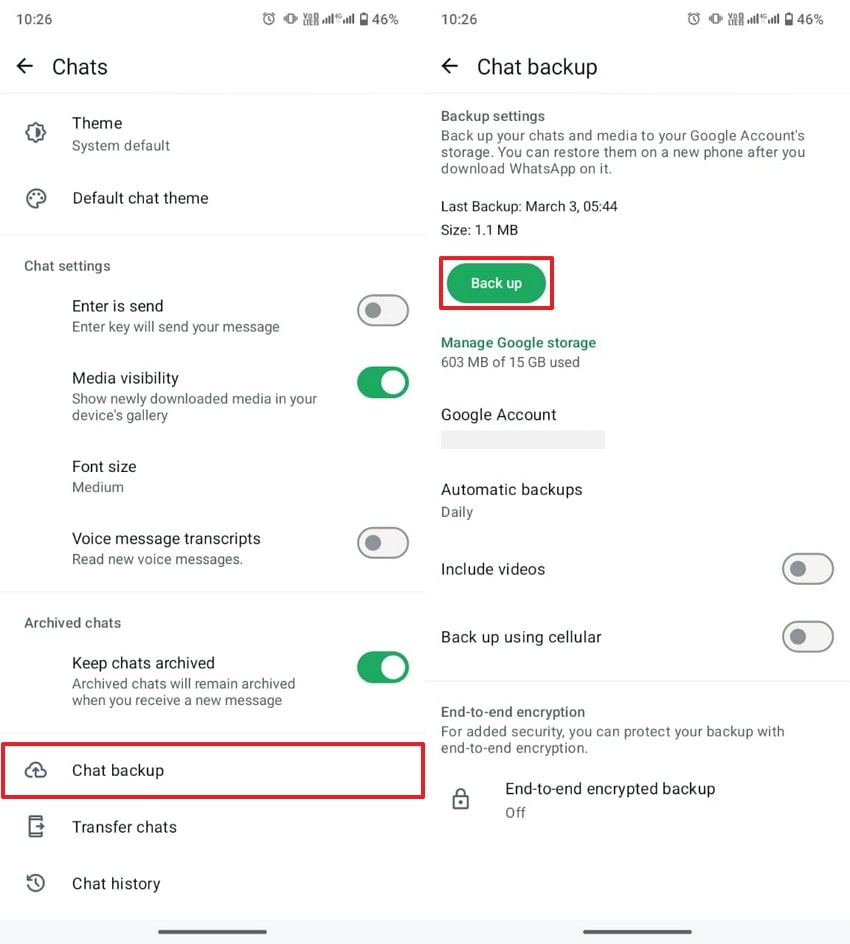
WhatsApp Chat Backup settings on Android
WhatsApp does not provide a normal “Recently Deleted” folder for chats.
If a deleted message was included in a suitable backup, restoring that
backup may bring the message back.
Check the date and time of your last backup before attempting a restore.
Messages that were sent or received after the backup may not be included
in the restored chat history.
Can You Recover Deleted WhatsApp Messages?
In some situations, yes. The key factor is whether the deleted message
existed in a backup that you can restore.
For Android users, WhatsApp supports backing up chat history to a
Google Account. WhatsApp says backups are connected
to the phone number and Google Account used to create them.

WhatsApp Google Account backup screen
Check Your WhatsApp Backup
On Android, open WhatsApp and go to:
Check the date and time shown for your latest successful backup.
Compare the Backup Date With the Deletion Date
This is one of the most important steps.
The backup may contain the deleted message.
That backup may no longer contain the deleted message.
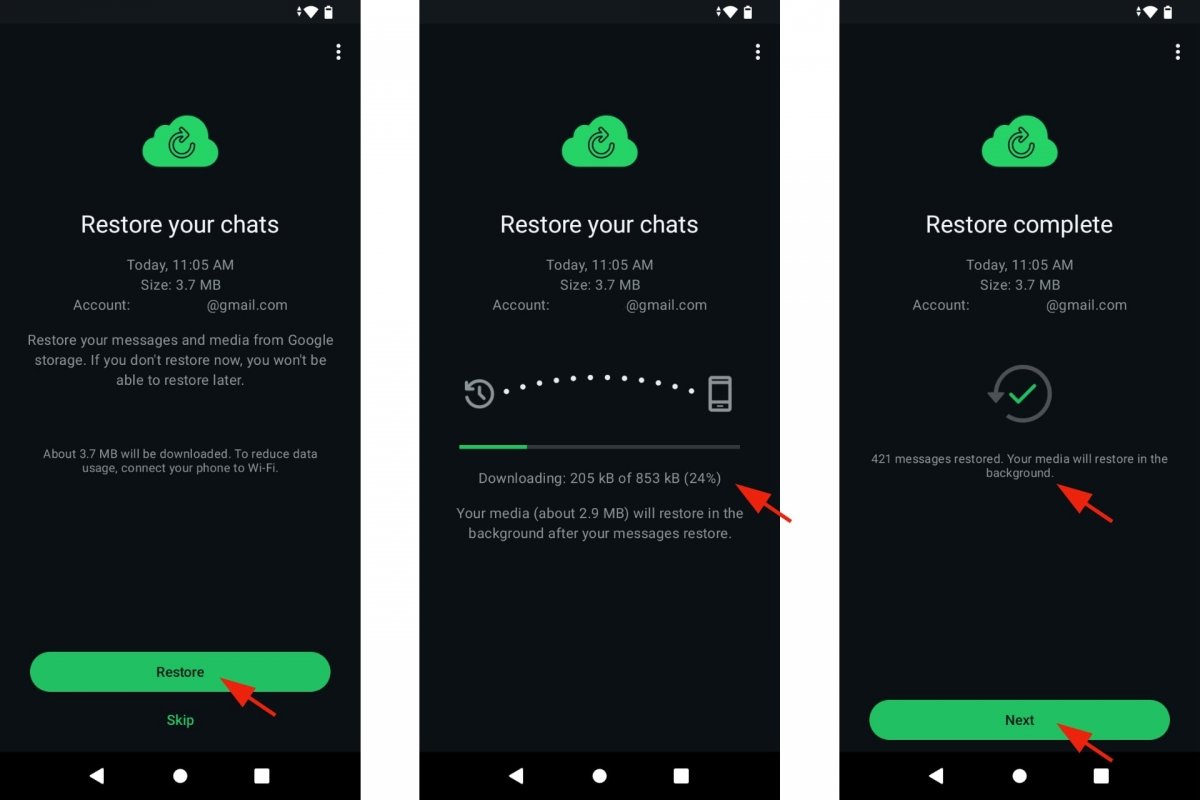
WhatsApp Restore Chats screen
Make Sure You Use the Same Google Account
Your WhatsApp Android backup is associated with the Google Account
used when the backup was created.
If WhatsApp cannot find your backup, check that the correct Google
Account is signed in on your phone.
- Same WhatsApp phone number
- Same Google Account
- Existing WhatsApp backup
- Enough storage for restoration
Reinstall WhatsApp to Start the Restore Process
WhatsApp’s current Android guidance says the restore option appears
during the initial setup process.
There is no regular Restore button inside the
Chat Backup settings page. You need to reinstall WhatsApp and
follow the setup process to reach the restore screen.
🔄 WhatsApp Restore Process
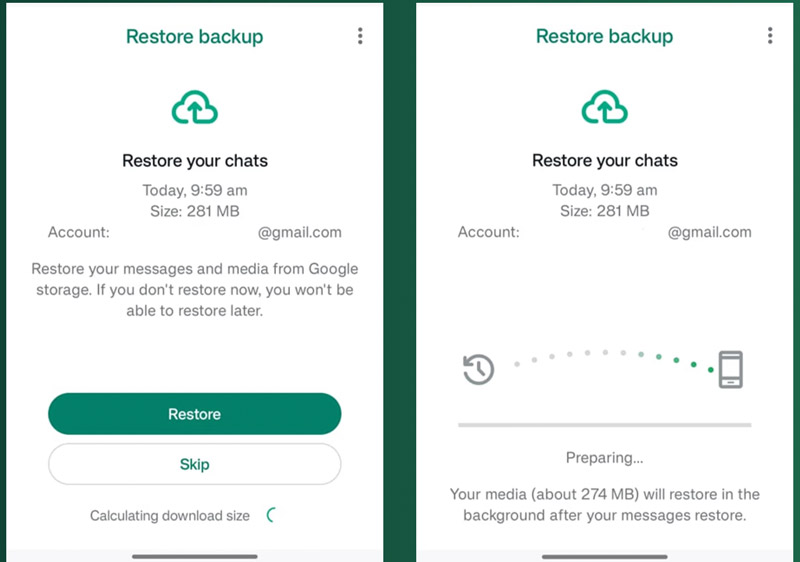
WhatsApp backup restoration on Android
Restoring an older backup restores the chat history contained in that
backup. Messages received after that backup was created may not be
included.
What If There Is No Backup?
If there is no suitable backup containing the deleted message,
WhatsApp does not provide an official method for restoring that
deleted chat history from its servers.
Be careful with websites or apps claiming that they can recover
every permanently deleted WhatsApp message. Recovery is not
guaranteed without an available backup.
How to Protect Your WhatsApp Chats in the Future
Regular backups can make it easier to restore your chat history if
something goes wrong in the future.
☁️ Enable Regular Backups
Go to Settings → Chats → Chat backup and
choose a backup schedule that suits you.
📶 Use a Stable Internet Connection
WhatsApp recommends a strong and stable internet connection
when creating a Google Account backup.
💾 Keep Enough Storage
Make sure your phone and Google Account have enough available
storage for the backup.
🔐 Consider End-to-End Encrypted Backup
WhatsApp provides an option for end-to-end encrypted backups.
If you enable it, keep your password, passkey, or encryption key safe.
What About Messages Deleted for Everyone?
Delete for Everyone removes the message from the
chat for the participants according to WhatsApp’s deletion feature.
It is different from deleting a chat on your own phone.
There is no standard WhatsApp “deleted messages folder” where
deleted messages can simply be opened again.
What Happens With Delete for Me?
Delete for Me removes the selected message from
your own copy of the conversation. It does not remove the same
message from the other person’s chat.
Delete for Me and
Delete for Everyone are different WhatsApp features.
Backup restoration is a separate process.
Frequently Asked Questions
Can I recover deleted WhatsApp messages without a backup?
WhatsApp does not provide an official server-based recovery method
for deleted chat history. A suitable backup is the main restore route.
Where do I check my WhatsApp backup?
On Android, open WhatsApp and go to
Settings → Chats → Chat backup.
Can an old backup restore a deleted message?
If the message was present when that backup was created,
restoring that backup may restore the message.
Why can’t WhatsApp restore my chats from its servers?
WhatsApp states that your chat history isn’t stored on its servers
in a way that allows WhatsApp to restore it for you.
What if WhatsApp cannot find my backup?
Check that you are using the same Google Account and phone number
associated with the backup. Also make sure your device has enough
storage and a stable internet connection.
Final Takeaway
Recovering a deleted WhatsApp message mainly depends on whether
you have a suitable backup.
On Android, check:
If the backup was created before the message was deleted,
restoring it may bring the missing chat history back.
📚 Related WhatsApp Guides
Note:
WhatsApp can change its interface and backup features in future updates.
Menu names and options may look slightly different depending on your
WhatsApp version and device.
Information source:
WhatsApp Help Center — Chat Backup and Chat Restore guidance.